A video splitter with no watermark — ever
The classic free-app trap: you split your video, and the export comes back stamped with someone else's logo — removable only through an upsell.
Split Video Into Parts never marks your footage. Exports are clean on the free version and on Pro. The only watermark that can appear on your clips is the one you add yourself — your handle, your logo, your show's branding.
What clean export means here
The checklist people search for, answered.
| Forced watermark | Never — on free and Pro alike |
|---|---|
| Account required | No |
| Quality on the free version | Original resolution and frame rate |
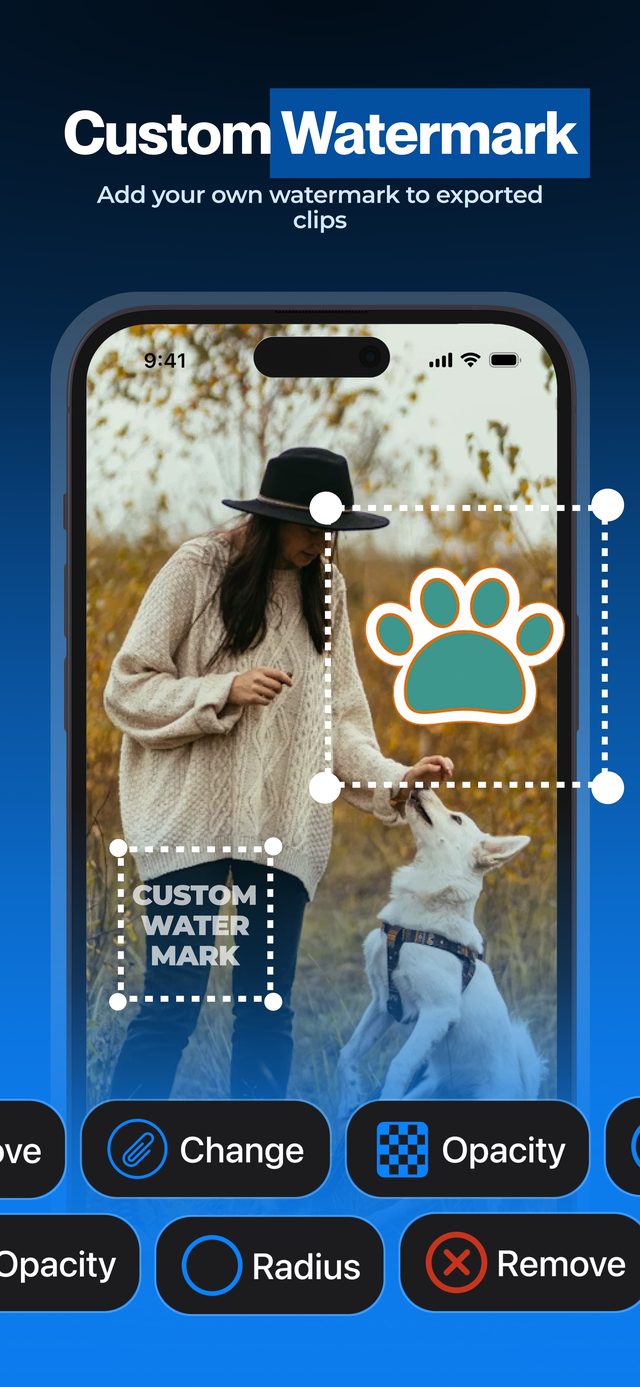
| Your own watermark | Optional, Pro — your logo with position, size, corners and opacity |
Your own watermark is a Pro feature for branding your clips — the app never stamps its own logo on anything.
How to split a video without any watermark
Download free
Get Split Video Into Parts from the App Store — no signup.
Split your video
By time, by number of parts, or manually with exact timecodes.
Export clean
Parts save to Photos with no logo, no overlay, no corner stamp.
Optional: brand it yourself
Tap Watermark, then Change to pick your logo (Pro) — drag, pinch and rotate it into place.
Clean exports, honest free tier
Your footage stays yours
No app logo burned into family videos, client work or content you plan to publish.
A free version you can use
Short videos split for free with no logo — Pro is for long videos and extras, not for removing a watermark.
Branding works for you
The watermark feature exists to promote your channel on your clips — not our app on your back.
Watermark removal is the most common upsell in free video apps. Here there is nothing to remove — exports start clean.
Frequently asked
Does Split Video Into Parts add a watermark to videos?
No, never. Exports are clean on the free version and on Pro. There is no logo to remove and no paid removal upsell.
Is the free version limited in quality?
No — parts keep the original resolution and frame rate. The free version is limited to short videos; Pro adds long videos, HDR export and muting.
Can I add my own watermark?
Yes, with Pro. Pick an image from your library or Files, then drag, pinch and rotate it and set corners and opacity — it appears on every exported part.
Why do other free splitters add watermarks?
It is a conversion tactic: the logo annoys you into paying for removal. This app charges for Pro features like long videos instead.
Do I need an account?
No. Download, split, export — no signup, and your video is never uploaded anywhere.
More ways to split
Start splitting videos in seconds.
Free download. No account required. Works offline.
Download on theApp Store